
What Happens to Points When an AutoCount Invoice Is Voided or Amended
What Happens to Points When an AutoCount Invoice Is Voided or Amended
What Is This?
When you cancel a sale in AutoCount, or lower its amount, Pixalink automatically takes back the points that sale gave the customer. You never have to adjust points by hand, and your customers' balances always stay honest.
How It Works
Every sale you sync from AutoCount can earn a customer points. If that sale later changes, Pixalink keeps the points in step with it.
- If you void (cancel) the sale, Pixalink removes all the points it earned.
- If you lower the sale amount, Pixalink removes only the difference.
Pixalink takes back the exact number of points the sale first gave. If the customer earned extra points because they were in a higher tier, the same higher rate is used to take them back. So the balance is always correct, down to the last point.
The change reaches Pixalink on the next sync with AutoCount, so it happens on its own without you lifting a finger.
flowchart TD
    A[Sale synced from AutoCount] --> B{Voided or amount lowered?}
    B -->|Voided| C[Pixalink removes all points from that sale]
    B -->|Amount lowered| D[Pixalink removes only the difference]
    C --> E[Customer point history shows the reversal]
    D --> E
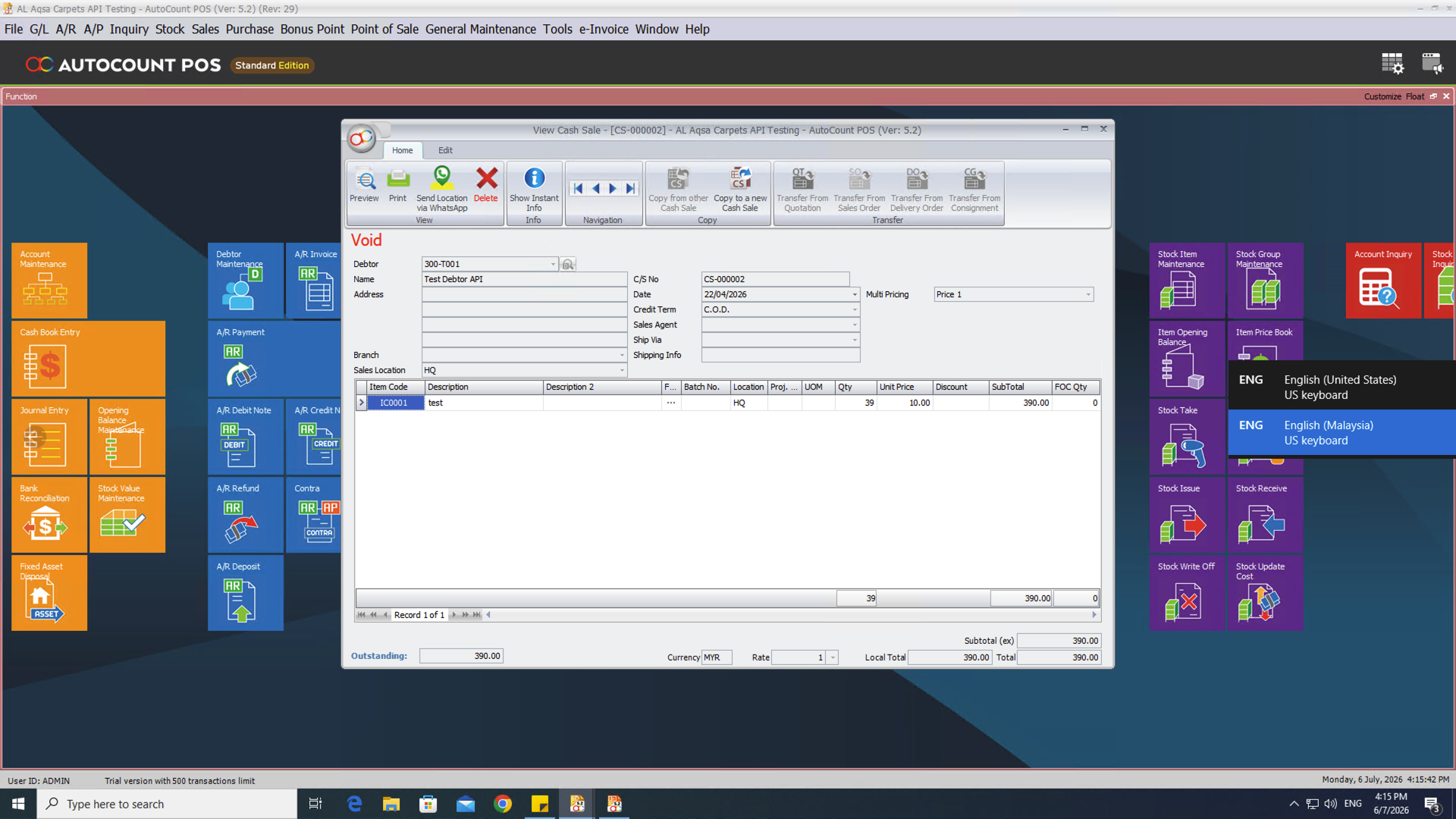
Here is the same sale after it was voided in AutoCount. This is the screen inside your accounting software.
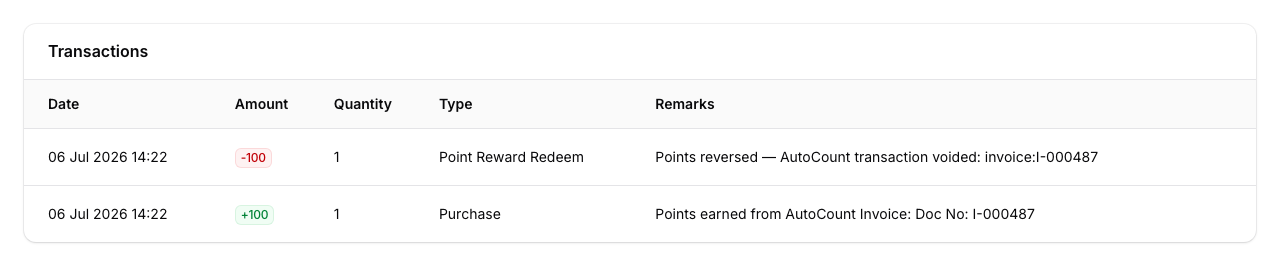
You can see the result in Pixalink. Go to Admin Panel → CRM → Customers, open the customer, then look at the Transactions tab.

The point history shows the original earn, plus a matching deduction. The note tells you which sale was reversed, so the trail is always clear.
Real-Life Example
Ahmad runs a seafood restaurant and uses AutoCount for his bills. One evening his customer Siti pays a RM100 bill and earns 100 points.
The next morning Ahmad spots that the bill was rung up twice by mistake. He voids the extra one in AutoCount, just as he normally would.
He does nothing in Pixalink. On the next sync, Pixalink sees the void and quietly takes back the 100 points from Siti's account.
When Siti checks her points later, the balance is right. Ahmad never touched a single setting, and his loyalty numbers stayed clean.
Good to Know
- A reversal only removes points from the sale that changed. Points from the customer's other visits are safe.
- Raising a sale amount does the opposite. Pixalink adds the extra points for the higher total.
- A change is only treated as a change to the same bill when the bill keeps its original date. If your POS terminal's bill numbering is reset and an old bill number comes up again, Pixalink treats the new bill as a brand-new sale and gives its points to the customer who actually bought — not to whoever bought on the old bill with that number.
- Deleting a sale outright works too, but more slowly. If you delete an invoice or a cash sale from AutoCount rather than voiding it, Pixalink notices it has gone and takes the points back on a once-a-day check that runs in the early hours. Voiding is picked up on the next sync, which runs every 15 minutes — so if you want the points reversed promptly, void the document instead of deleting it.
- If a sale earned no points yet (for example, it was still unpaid), there is nothing to take back.
- Returns raised as credit notes take back the points for the returned amount. A credit note for the whole sale takes back every point. See What Happens to Points When You Issue an AutoCount Credit Note.
- Refunds sent through your point-of-sale connection reverse points the same way — the same idea covered in our Posting Refunds guide.
Need Help?
Our support team is happy to walk you through how reversals show up for your outlet. Just reach out.