
Paid Membership Expiry Dates Explained
What Is This?
Every paid membership you sell has an expiry date. Pixalink sets that date for you, based on when the membership starts and the billing cycle you priced. This means you always know when a member's access ends, and when it is time to invite them to renew.
Video Walkthrough
How It Works
The rule is simple. The expiry date is the start date plus one billing cycle.
- Monthly: start date plus one month
- Yearly: start date plus one year
- Lifetime: never expires
The start date is normally the moment the membership begins, which is when the customer buys it. The expiry lands on the same day in the next period. There is no rounding to the end of the month. A yearly membership that begins on 26 January 2026 expires on 26 January 2027.
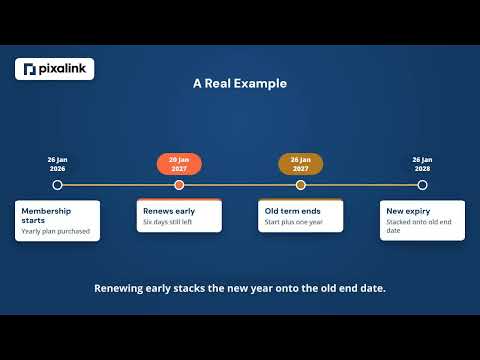
Renewals stack onto the time already left. When a member renews before their expiry date, the new cycle is added on top of the remaining days, so nobody loses time they paid for. If a member renews after the membership has already lapsed, the new cycle starts from the renewal date instead.
A renewal reminder goes out before the expiry date, seven days ahead by default. Once the expiry date passes, the membership is marked inactive automatically during a daily check.
gantt
    title Yearly Membership Timeline
    dateFormat YYYY-MM-DD
    axisFormat %b %Y
    section First term
    Membership active :active, a1, 2026-01-26, 2027-01-26
    Renewal reminder :milestone, m1, 2027-01-19, 0d
    section After renewal
    Renewed term :a2, 2027-01-26, 2028-01-26
Real-Life Example
Wei Lin buys a yearly membership at Aishah's cafe on 26 January 2026. Pixalink sets her expiry to 26 January 2027. Seven days before that date, Wei Lin gets a reminder. She renews on 20 January 2027 while still active, so her new term runs to 26 January 2028. The few days she had left are kept, not thrown away.
Good to Know
- Migrated members: the expiry follows the start date stamped during the import. If you bring in a batch on 26 January 2026 and set that as their start date, they all expire on 26 January 2027. Set the start dates with care so the expiry lands where you expect.
- Lifetime memberships never expire, and they cannot be renewed or extended.
- Manual extensions: your team can add a set number of days to a membership as a goodwill gesture, which pushes the expiry date later.
- Reminder timing can be changed in your notification settings if seven days does not suit you.
Need Help?
If a member's expiry date looks wrong, reach out to our support team through live chat or email and we will check it with you.
What's Next?
- Paid Memberships — full guide to setting up your membership plans
- How to Automatically Give Vouchers to Paid Members — reward members the moment they join
- How Customer Membership Statuses Work — see how active and expired members are labelled