
Customer Loyalty Tiers — How Point Usage and Expiry Affects Your Tier Level
Customer Loyalty Tiers — How Point Usage and Expiry Affects Your Tier Level
What Is This?
Your loyalty tier is calculated from your purchase points — not from your current spendable balance. That means using points for rewards never drops your tier. Only two things can lower a tier: returning a purchase, or purchase points expiring (if expiry is enabled).
Real-Life Example
Nurul has 550 purchase points and sits in the Gold Tier. She redeems 100 points for a free drink. Her spendable balance drops to 450 — but her tier stays at Gold, because the tier calculation still sees 550 purchase points. She keeps all her Gold benefits without doing anything extra.
How Tiers Are Calculated
Your tier is always based on purchase transactions only. Redemptions are invisible to the tier engine.
There are two modes depending on whether point expiry is enabled:
Point Expiry Disabled — Lifetime Purchase System
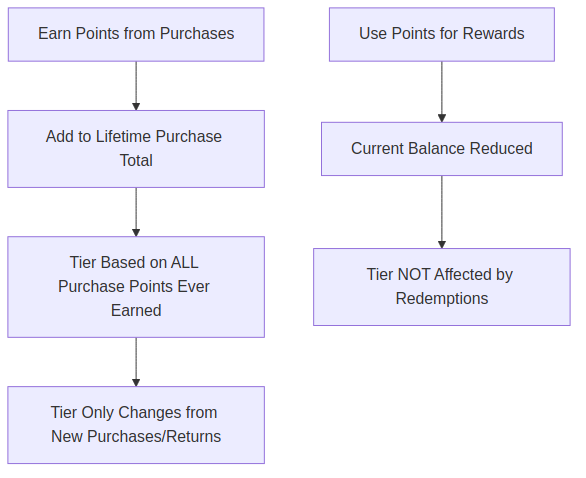
- Tier is based on every purchase point ever earned
- Redeeming points has no effect on tier
- Tier only drops if a purchase is returned
Point Expiry Enabled — Rolling Window System
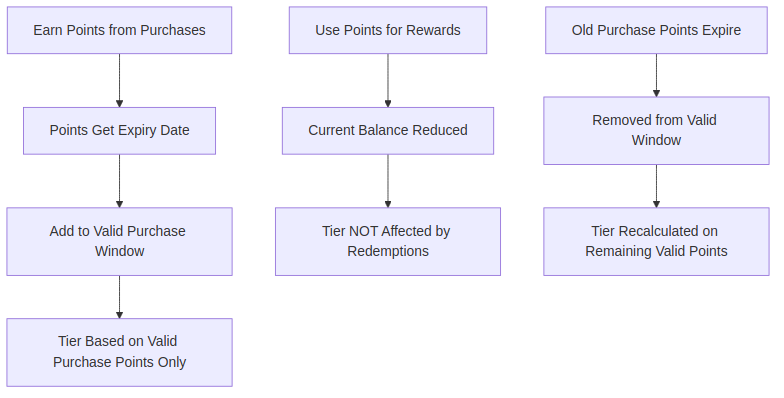
- Tier is based only on purchase points within the active validity window (e.g., last 90 days)
- Redeeming points has no effect on tier
- Tier drops when old purchase points fall outside the window
What Changes Your Tier
| Event | Affects tier? |
|---|---|
| Earning purchase points | Yes — tier goes up |
| Redeeming points for rewards | No |
| Returning a purchase | Yes — tier may go down |
| Purchase points expiring (if enabled) | Yes — tier may go down |
| Staff manually assigning a tier | Overrides all automatic rules |
Case Study: Aisha's First Six Months
Here is a step-by-step walkthrough of one customer, showing exactly what happens to her tier as she earns and then redeems points. In this example the tiers are Member (0–199 points), Silver (200–499 points), and Gold (500 points and above).
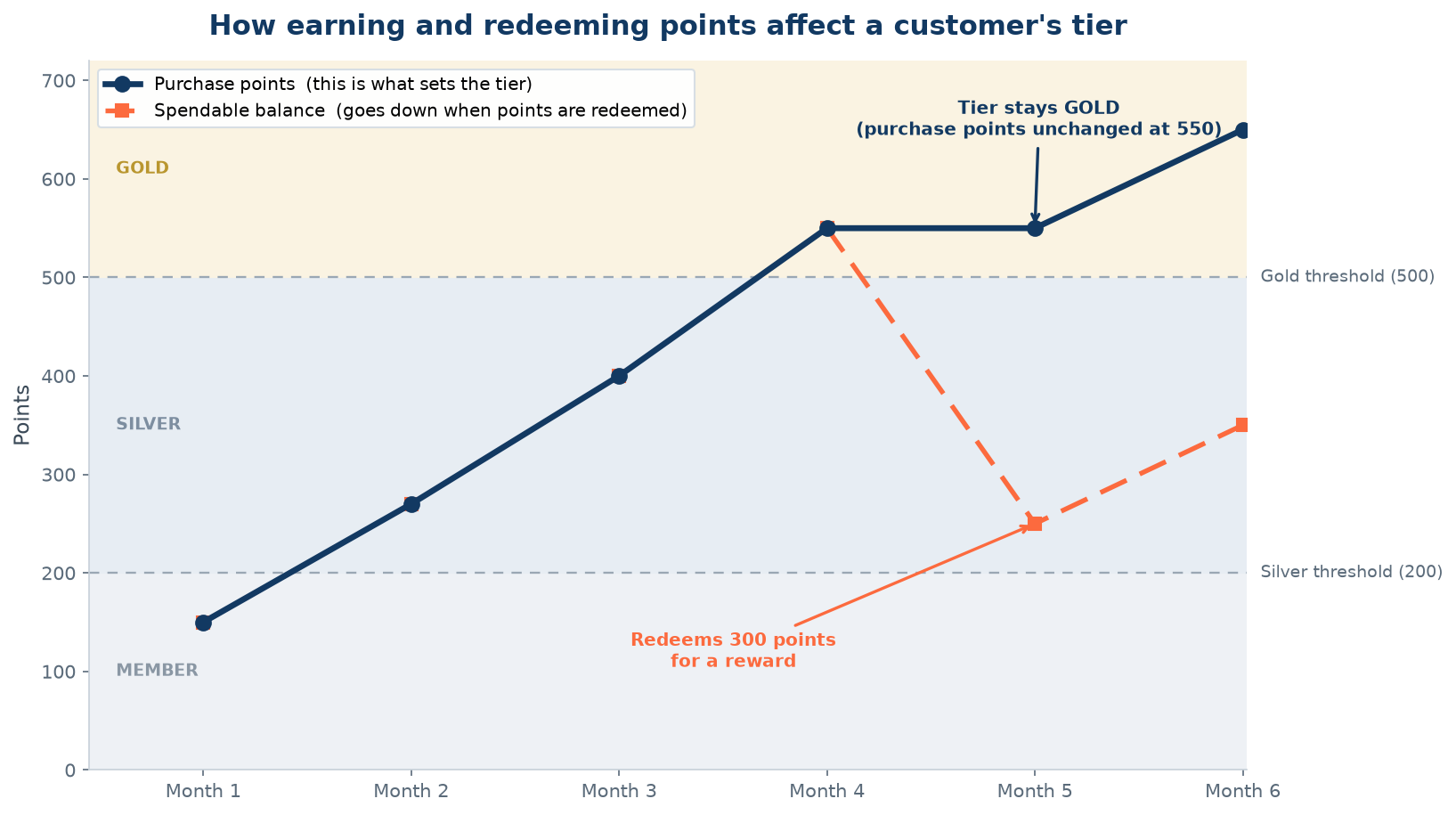
The transaction log
| When | What happened | Purchase points (sets the tier) | Spendable balance | Tier |
|---|---|---|---|---|
| Month 1 | Buys, earns 150 points | 150 | 150 | Member |
| Month 2 | Buys, earns 120 points | 270 | 270 | Silver (moved up) |
| Month 3 | Buys, earns 130 points | 400 | 400 | Silver |
| Month 4 | Buys, earns 150 points | 550 | 550 | Gold (moved up) |
| Month 5 | Redeems 300 points for a reward | 550 | 250 | Gold (unchanged) |
| Month 6 | Buys, earns 100 points | 650 | 350 | Gold |
What the chart shows
- The navy line (purchase points) only ever goes up as Aisha spends. This is the number the tier engine looks at.
- The coral line (spendable balance) goes up when she earns and down when she redeems.
- In Month 5, Aisha spends 300 points on a reward. Her spendable balance falls from 550 to 250, but her purchase-points total is still 550, so she stays in Gold. Redemptions are invisible to the tier engine.
- By Month 6 she has earned more, so even her spendable balance is climbing again, while her tier has comfortably stayed Gold the whole time.
How this would differ with point expiry turned on
If point expiry is enabled, the tier is based on purchase points earned within the active window (for example, the last 90 days). Redeeming still would not change her tier. But if the 150 points she earned in Month 1 aged out of the window, her qualifying total would drop by 150, and that could pull her tier down. In this mode, it is expiry, not redemption, that moves a tier down.
When Tier Changes Happen
- Immediately when new purchase points are earned
- Immediately when a purchase is returned
- Automatically at midnight when purchase points expire (expiry-enabled mode only)
What Customers Keep After a Tier Drop
- All rewards already redeemed stay theirs
- Any physical items or vouchers received remain valid
- Access to higher-tier benefits stops going forward
What Your Customers Will See
Customers see their current tier displayed in their loyalty profile on the customer portal. When their tier changes — whether they move up or drop down — the new tier name and any associated benefits are reflected right away. They don't need to refresh or do anything; the update happens automatically.
Good to Know
- A manually assigned tier is locked — it will not change automatically based on points
- Customers can check their tier and point history in their loyalty portal
- Point expiry (if enabled) uses a rolling window — each point expires based on when it was earned, not when the customer last visited
What's Next?
- Learn how to configure tier thresholds under Admin Panel → Loyalty Program → Tiers
- See how point expiry is set up under Admin Panel → Loyalty Program → Points Configuration