
Why Your Admin Panel Says Subscription Ended
What Is This?
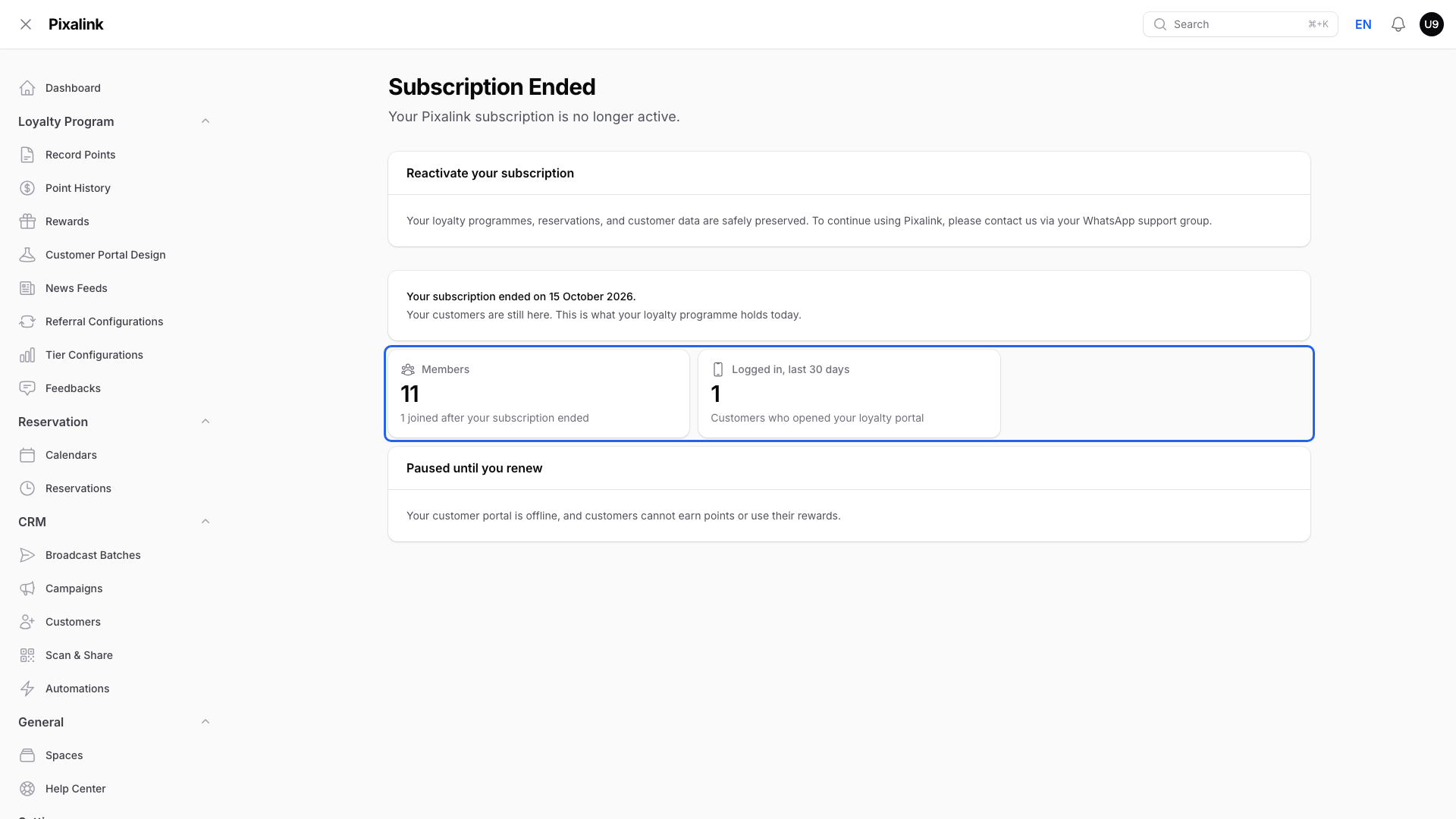
Your Admin Panel opens on a page that says Subscription Ended. This means your Pixalink subscription isn't active right now. It can happen when a renewal invoice didn't reach you in time.
The good news: your data is safe, and our team can turn your account back on. This guide explains what you see, what stays in place, and what to do.
How It Works
While your subscription isn't active, every Admin Panel page takes your team to the Subscription Ended page.

The page says your data is kept and asks you to contact us in your WhatsApp support group.
The page also shows the date your subscription ended and what your loyalty programme holds today: Members, Logged in, last 30 days, Visited, last 30 days, Points customers hold and Rewards not yet used. A box only shows when it has a number above zero.
Some team members see an access-denied page instead, depending on their role. It's the same situation, and the same fix.
What stays in place
- Customers. Every customer profile stays in your account.
- Points. Each customer's points history is kept.
- Settings. Your rewards, tiers, outlets and portal design stay as you left them.
- Customer portal. It stays open for 7 days after your subscription ends (a short grace period). After that it goes offline until you renew, so customers can't use it to check points or use rewards. Their points and rewards are kept.
Dates you set still apply. If points have an expiry date, or a reward has an end date, those still happen on time.
What to do
If the page shows a Renew subscription button, click it. It sends your renewal request to our team in your WhatsApp support group, or opens a WhatsApp chat with us. You'll see Renewal request sent. If you click again within an hour, you'll see Renewal request already sent. If you see We could not send your request, message us in your WhatsApp support group instead.
If there's no button, or you'd rather talk to us, the fix goes through our team.
- Message us in your WhatsApp support group. Say your Admin Panel shows Subscription Ended.
- We'll sort out the invoice with you and turn your subscription back on.
- Log in again. Your team sees the normal Admin Panel, with nothing to set up again.
Turning your account back on doesn't change your price.
Real-Life Example
Aishah runs a small clinic in Shah Alam. Her patients collect points on each visit. One Monday, her receptionist opens the Admin Panel to record points and sees Subscription Ended. The renewal invoice had not reached Aishah. She worried her 800 patients and their points were gone. She messaged the Pixalink team in her WhatsApp support group, and they sorted out the invoice with her. Her team logged in again and found every patient, their points history and her rewards still there, at the same price.
Good to Know
- Nothing is deleted while your subscription is inactive.
- Your team can send a renewal request from the Admin Panel, but only our team can turn the account back on.
- Your price stays the same when we turn your account back on.
- Planning to pause Pixalink on purpose? Tell us in the same group, and we'll keep your data for when you return.
Need Help?
Seeing Subscription Ended? Message us in your WhatsApp support group, and we'll get you running again.