
Membership Day Campaign
Membership Day Campaign
What Is This?
Membership Day is an automated campaign that sends a promotional message to all your customers on the same day every month. Pick a day, set a discount, and the system handles the rest — no manual sending needed.
Real-Life Example
Aini runs a bubble tea shop and picks the 22nd as her Membership Day. Every month on the 22nd, all her customers automatically receive a WhatsApp message: "🎊 Hey Wei Lin! It's Membership Day! Enjoy 11% off all drinks today only." Regulars look forward to it. Some customers specifically plan their visit around it. Aini set it up once and hasn't touched it since.
How to Set It Up
-
Go to CRM → Campaigns in the left sidebar
-
Click Create Templated Campaign and select 🎊 Membership Day
-
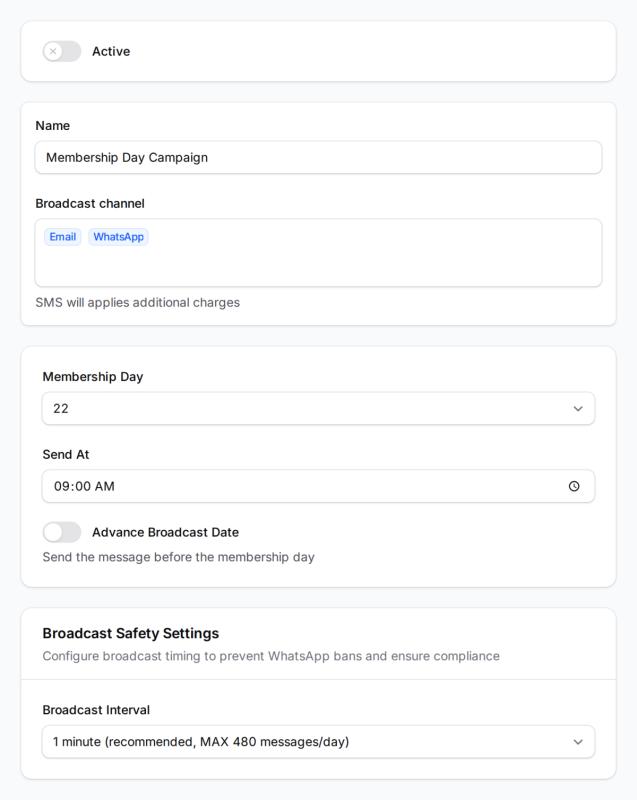
Fill in the campaign form:
- Membership Day — which day of the month the campaign runs (1–31)
- Send At — the time messages go out (default: 9:00 AM)
- Broadcast Channels — Email, SMS, or WhatsApp (SMS and WhatsApp have additional charges and require prior setup)
- Advance Broadcast Date — turn this on if you want the message to go out a few days before the day instead of on it
-
Toggle the campaign to Active and click Save
What Your Customers Will See
On your chosen day each month, every customer in your database receives a personalised message with their name and your offer. The default message reads something like:
"🎊 Hey Wei Lin! It's Membership Day! Enjoy 11% off all drinks today only. Valid until midnight! 🎉"
You can customise the message content to match your branding and offer.
Good to Know
- You can only have one Membership Day campaign per account — edit the existing one to change the day or offer
- If you set Membership Day to the 31st, the campaign will skip months that don't have 31 days
- The campaign sends to all customers in your database on that day, every month automatically
- SMS and WhatsApp require additional setup — contact support if those channels aren't available
- Use Advance Broadcast Date to send the message a few days early, useful if you want customers to plan ahead
What's Next?
- Set up a Win Back Lost Customers campaign to automatically re-engage customers who go quiet
- Create a Birthday Campaign to send personalised messages on your customers' birthdays
- Review past sends under CRM → Campaigns to track engagement over time