
How Loyalty Points Are Earned at POS
How Loyalty Points Are Earned at POS
What Is This?
When your customers make purchases at a restaurant or store using a POS system integrated with Pixalink, they automatically earn loyalty points every time their order is settled. No manual entry, no extra steps — points are calculated and credited the moment the bill is closed.
This applies to all supported POS integrations including Eats365, Loyverse, StorehubPOS, GeniusPOS, and others.
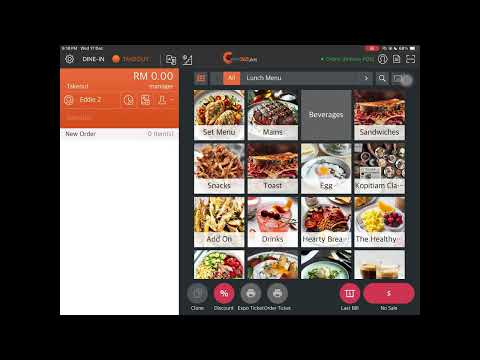
Video Walkthrough
Real-Life Example
Ahmad runs a nasi lemak restaurant in Petaling Jaya. His regular customer, Siti, orders a meal worth RM45. When the cashier closes the bill, Siti instantly earns points based on the restaurant's loyalty rate. If Siti is a Gold-tier member with a 2x point multiplier, she earns double the standard amount. Later, Siti checks her loyalty app and sees her updated balance right away.
One day, Siti's order is accidentally rung up twice. The cashier voids the duplicate — and the points from that voided transaction are automatically reversed. No manual correction needed.
How It Works
graph TD
    A["Customer Makes Purchase<br/>at POS Terminal"] --> B["Cashier Closes the Bill"]
    B --> C{"Credit Top-Up Products<br/>in Order?"}
    C -->|Yes| D["Subtract Top-Up Amount<br/>from Order Total"]
    C -->|No| E["Use Full Order Amount"]
    D --> F{"Remaining Amount > 0?"}
    F -->|Yes| G["Calculate Points<br/>× Tier Multiplier"]
    F -->|No| H["No Points Awarded<br/>(Pure Top-Up Order)"]
    E --> G
    G --> I["Points Added to<br/>Customer Balance"]
-
Order is settled — When the cashier closes a bill on the POS, the system sends the order details to Pixalink automatically.
-
Points are calculated — The system looks at the total purchase amount and applies your loyalty programme's earning rate. If the customer has a tier with a point multiplier, that multiplier is applied too.
-
Credit top-ups are excluded — If the customer bought a credit top-up product as part of their order (e.g., a "RM50 Wallet Top-Up"), that amount is subtracted before calculating points. This prevents customers from earning points on wallet reloads.
-
Pure top-up orders earn zero points — If the entire order is just credit top-up products with no food or drinks, no points are awarded at all.
-
Points appear instantly — The customer's point balance updates in real time. The next time they're looked up on the POS or check their loyalty app, the new balance is already there.
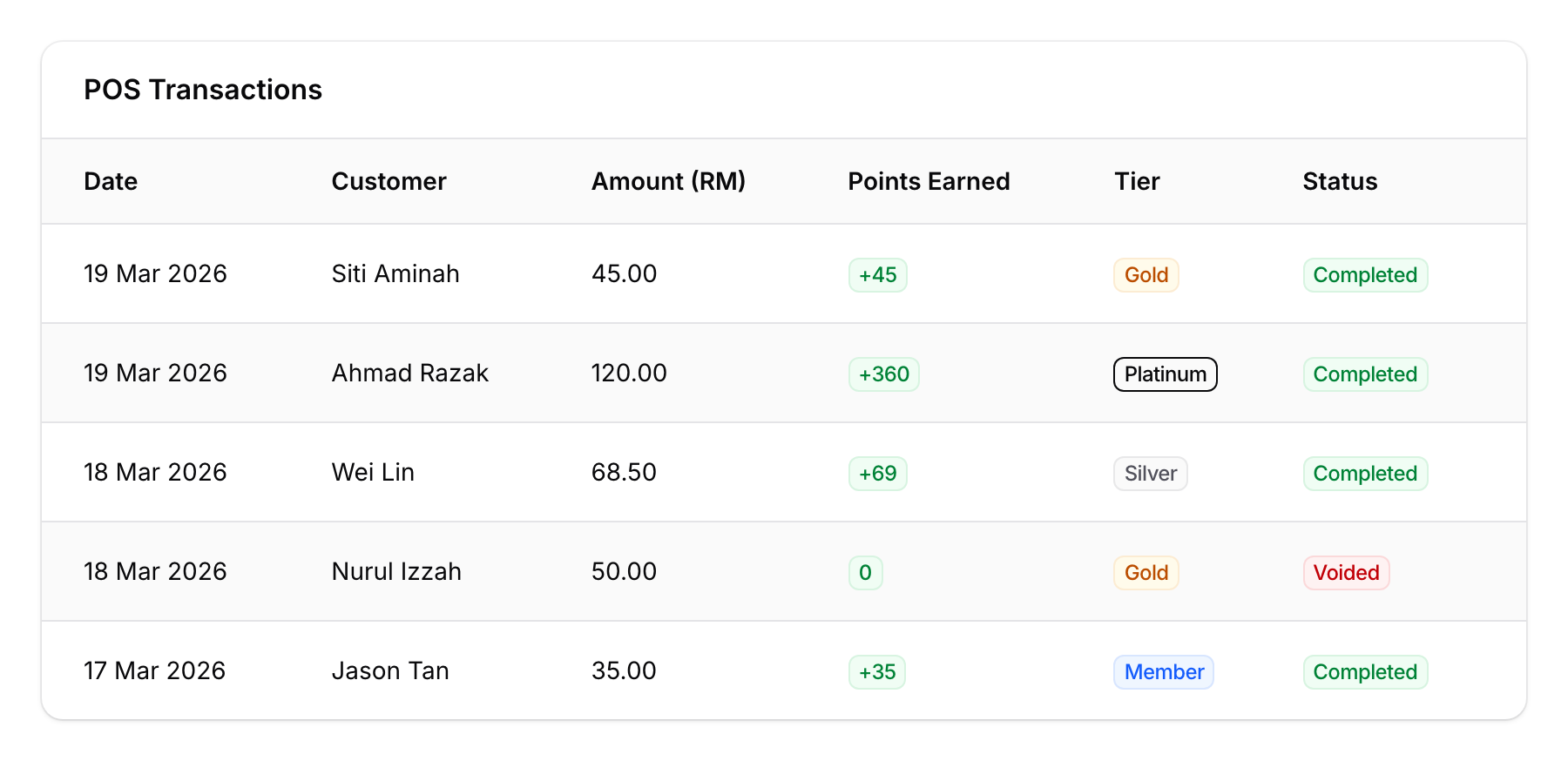
The POS Transactions view shows each transaction with the customer's tier, points earned, and status. Notice that the voided transaction (Nurul Izzah) shows 0 points.
What Happens When an Order Is Voided
If a transaction is voided on the POS:
- Points are fully reversed — The points earned from that transaction are deducted from the customer's balance.
- Credit top-ups are also reversed — If the order included a wallet top-up, that credit is reverted too.
- Everything is automatic — Your staff just process the void as usual on the POS. The loyalty system handles the rest.
How Customers Check Their Points
Customers can see their point balance in several ways:
- At the POS — When the cashier looks up a customer by phone number or member ID, the profile shows their current points, credit balance, tier, and available rewards.
- On the loyalty app — Customers can log in to their loyalty portal to view their full transaction history and point balance.
Tier Multipliers
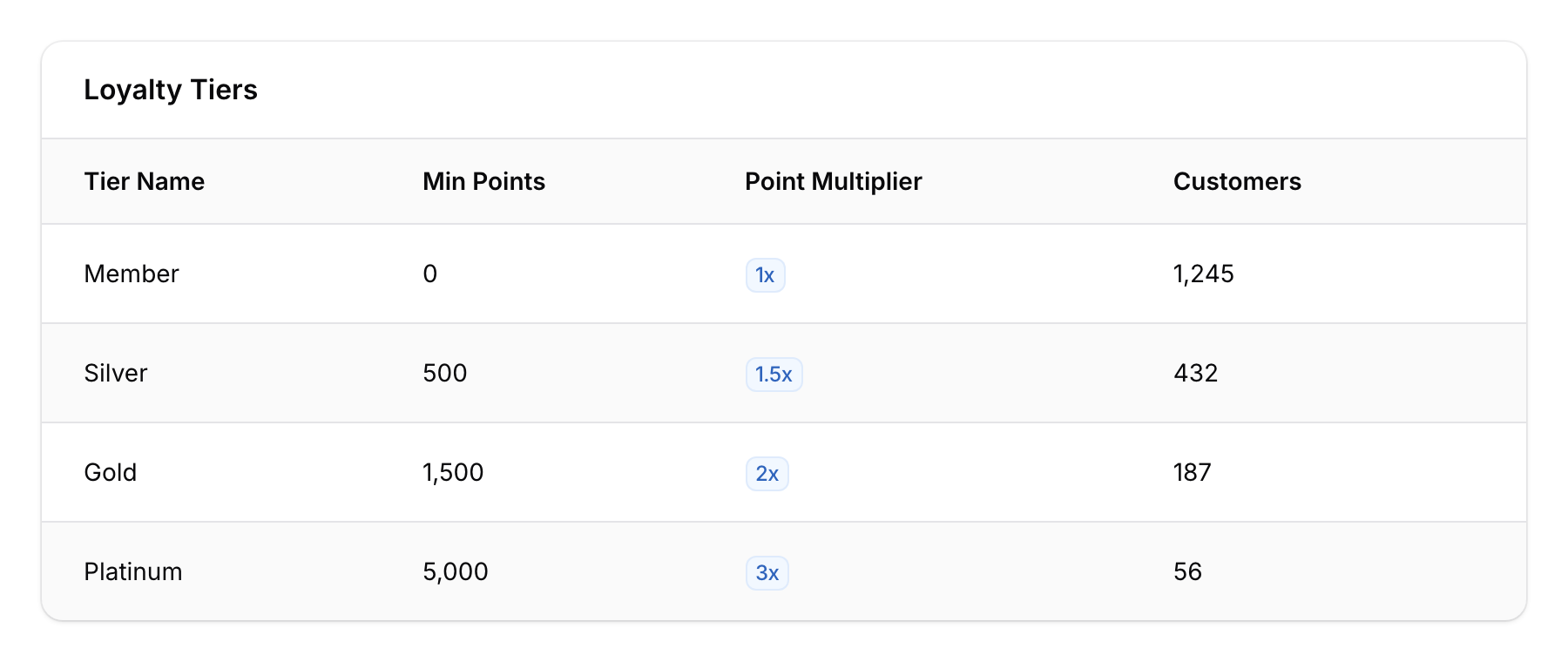
If your loyalty programme uses tiers, higher-tier members can earn points faster:
| Tier | Multiplier | RM100 Purchase |
|---|---|---|
| Member | 1x | Standard points |
| Silver | 1.5x | 50% more points |
| Gold | 2x | Double points |
| Platinum | 3x | Triple points |
Note: The tiers and multipliers above are examples only. Your actual tiers and multiplier values depend on how your loyalty programme is configured.
Good to Know
- Points are earned on every settled order — No minimum spend required (unless your programme is configured with one).
- Works across all outlets — A customer earns points at any of your POS-connected locations, and the balance is shared across all branches.
- Voided transactions are handled automatically — No need to manually adjust point balances after a void.
- Credit top-up purchases don't earn points — This is by design, to prevent double-dipping (earning points on money that will be spent again later as credit).
- Duplicate transactions are prevented — If the POS sends the same order twice due to a network issue, only the first one is processed.
- Supported POS systems — Eats365, Loyverse, StorehubPOS, GeniusPOS, SoftinnPMS, and iVendPOS all support automatic point earning.