
Why Pixalink Voucher Codes Don't Work in Shopify Draft Orders (and What to Do Instead)
Why Pixalink Voucher Codes Don't Work in Shopify Draft Orders (and What to Do Instead)
When your rewards are synced to Shopify, every voucher a customer claims in Pixalink also exists as a discount code in your Shopify store. These codes work at your online checkout and at Shopify POS — but they cannot be entered on Draft Orders in the Shopify admin. This is a Shopify platform limitation, not a problem with your voucher or your Pixalink settings. This guide explains why, and shows the workaround for draft orders.
How voucher codes reach Shopify
When a reward is imported and synced with Shopify (see How to Import Shopify Vouchers), Pixalink creates each voucher as a unique single-use code attached to a shared discount in your store. This structure is what lets hundreds of individual voucher codes share one discount configuration (value, expiry, one-use-per-customer) while each code remains personal and single-use.
Where the codes work
| Channel | Works? | How |
|---|---|---|
| Online store checkout | Yes | Customer types the code in the Discount code field |
| Shopify POS | Yes | Scan the QR on the customer's voucher screen (Add discount → Scan discount code), or type the code manually |
| Draft Orders (admin Create order) | No | Shopify does not support this type of code in draft orders — see below |
Why Draft Orders reject the code
Shopify's Draft Order discount field only accepts a discount's primary code. Additional unique codes generated under a shared discount — the structure Pixalink uses so every voucher is individually single-use — are not recognised there. When staff type a voucher code into Add discount → Discount codes on a draft order, nothing attaches, even though the exact same code scans fine at POS and works at online checkout.
Shopify has acknowledged this as a known limitation of draft orders (Shopify developer forum thread). There is no store setting that changes this behaviour.
Update — fix in progress: We are updating how Pixalink syncs vouchers to Shopify so that each voucher becomes its own standalone discount, which draft orders accept. Once this update is released, newly synced vouchers will work in Draft Orders directly. Vouchers that were already synced before the update will continue to need the workaround below.
Workaround: apply the voucher as a custom discount
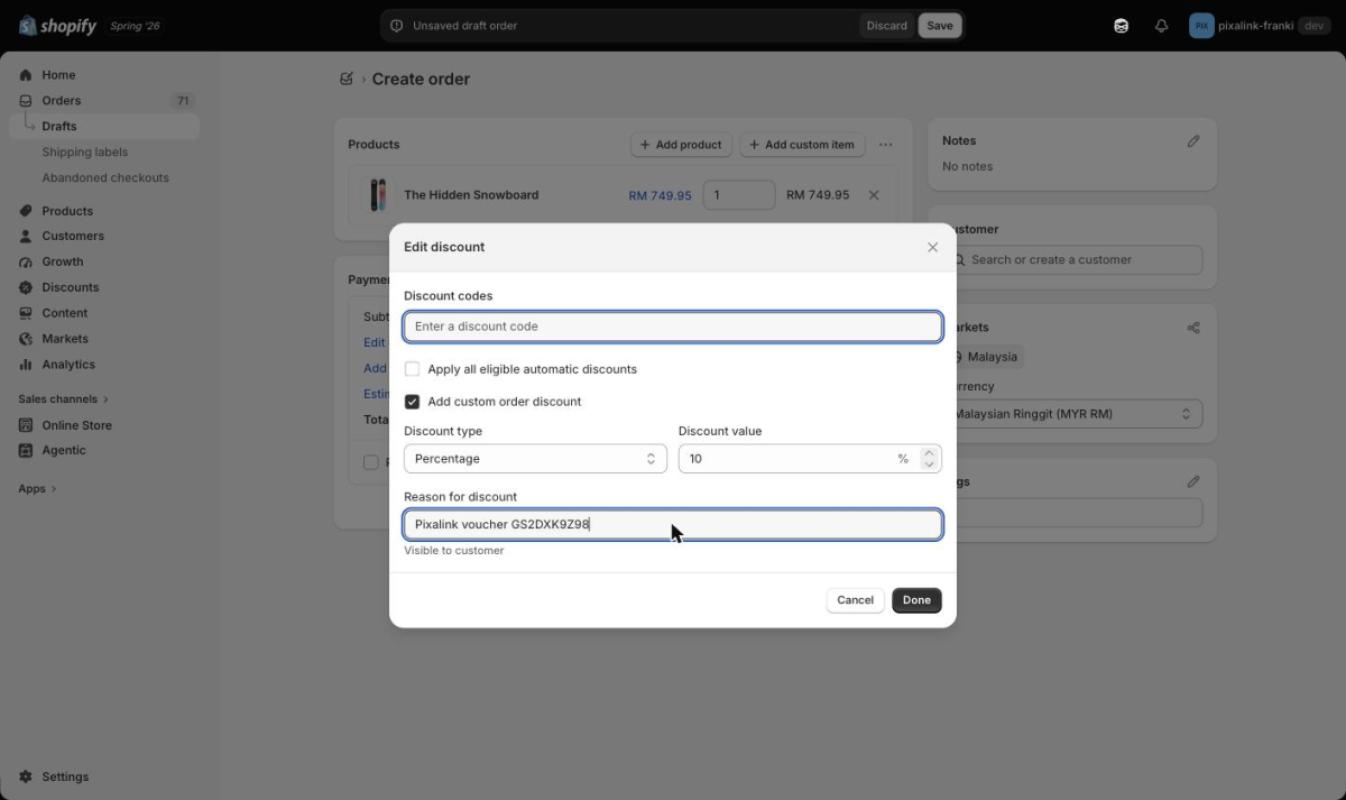
If you need to honour a customer's voucher on a draft order, apply the same value manually as a custom order discount:
- In the draft order, click Add discount.
- Tick Add custom order discount.
- Set the Discount type and value to match the voucher (e.g. Percentage, 10%).
- In Reason for discount, enter the voucher code (e.g.
Pixalink voucher GS2DXK9Z98) — this keeps a record on the order of which voucher was honoured. - Click Done — the discount now applies to the order.
The discount appears in the Payment section with the voucher code visible as the reason:
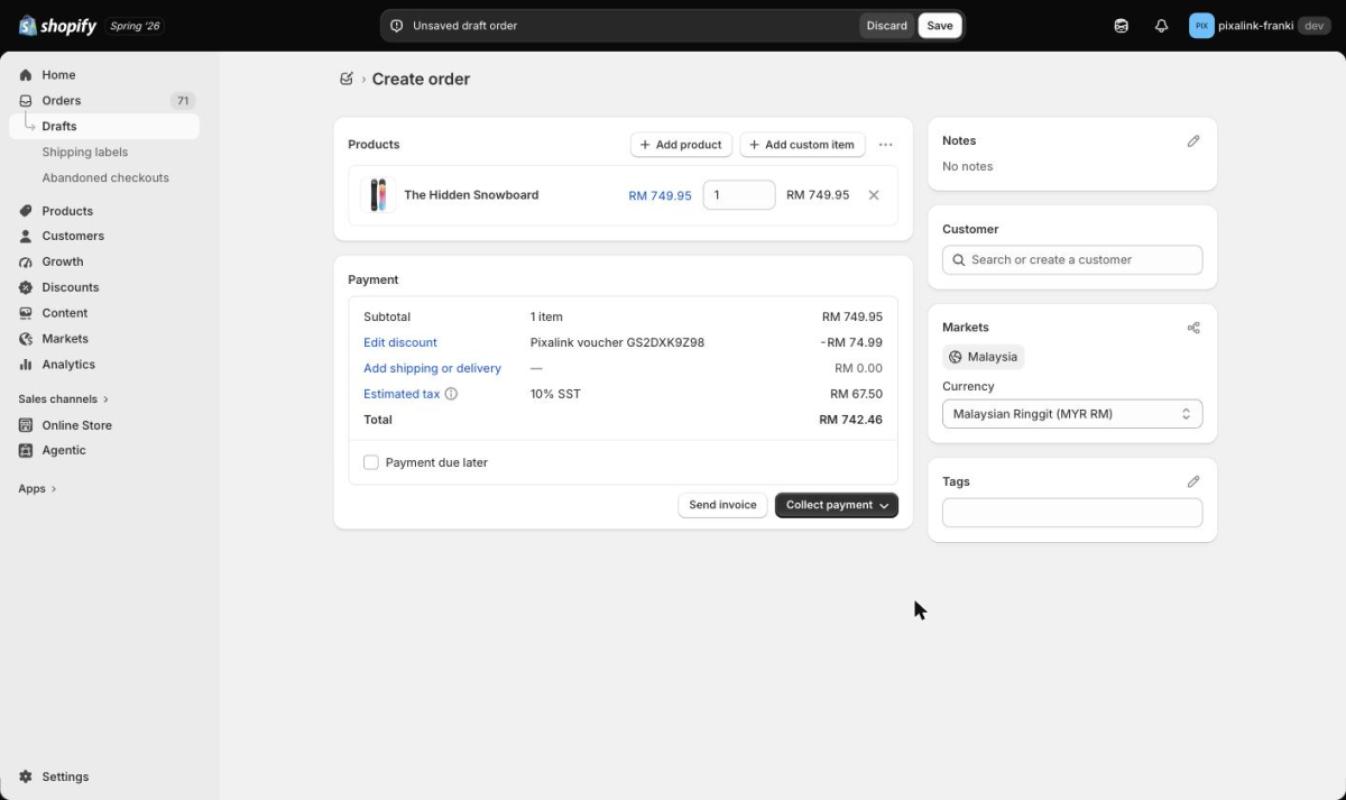
Important: because the voucher code itself was not consumed by Shopify, also redeem the voucher in Pixalink so it is marked as used and cannot be redeemed again elsewhere. Follow How to Redeem a Customer Voucher at Your Counter — scan or enter the customer's voucher in the admin panel as you would for an in-store redemption.
Troubleshooting codes at POS or online checkout
If a voucher code is rejected at POS or online checkout (where they are supported), check:
| Check | Why it matters |
|---|---|
| Has the code already been used? | Voucher codes are single-use; a redeemed voucher will not work again |
| Is the voucher expired? | The Shopify discount carries the voucher's expiry date |
| Is another discount already applied? | Voucher codes do not combine with other discounts — remove other codes or automatic discounts first |
| Has this customer used this reward before? | "One use per customer" blocks a second redemption by the same customer |
| Was the reward synced to Shopify? | Only rewards imported with Shopify sync enabled exist as discount codes |
If the code still fails after all checks pass, contact Pixalink support with the voucher code and a screenshot — we can verify the code's live status in Shopify for you.
Notes and limits
- Shipping discounts and Buy X Get Y codes are also unsupported in Draft Orders by Shopify, regardless of how they were created.
- Invoices sent from a draft order only accept discount codes at checkout if "Discount codes" was enabled when creating the invoice — and even then, Pixalink voucher codes are subject to the same limitation above.