
Why a WhatsApp Message Shows "Waiting for This Message"
What Is This?
Sometimes a WhatsApp message does not show up right away. Instead you see a grey bubble that says "Waiting for this message. This may take a while."
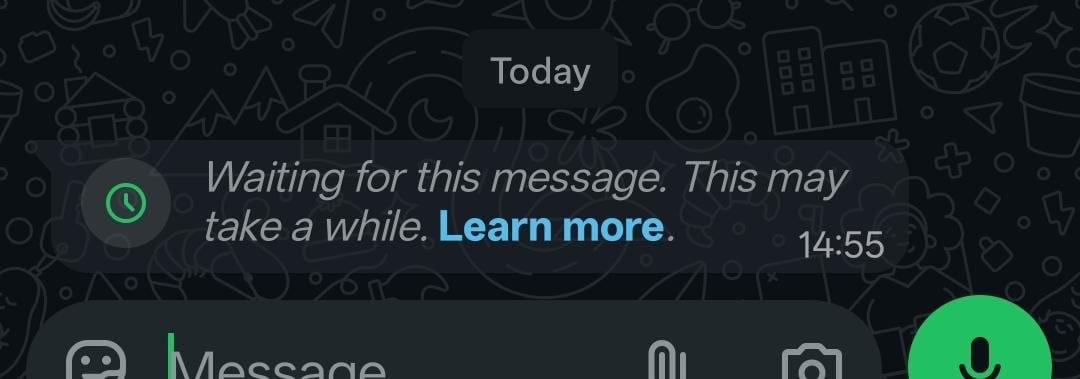
This is a WhatsApp thing, not a Pixalink fault, and usually not a broken phone. Most of the time the message loads by itself once the phone is back online. Here is why it happens and what to do.
How It Works
WhatsApp needs the receiving phone to be online to finish loading a new message. If that phone is switched off, has no signal, or runs an old version of WhatsApp, the message cannot load yet. WhatsApp shows the grey waiting note in the meantime.
The moment the phone gets a good connection again, the message loads and the real text appears. Usually this takes only a few seconds. On a weak connection it can take a little longer.
Your company phone can show this too. This is the phone your WhatsApp Number is signed in on, and Pixalink sends your messages using that same number. If the phone loses signal or goes offline, messages coming in and going out can slow down until it reconnects.
What you can do
- Check that the phone has internet, and try switching between Wi-Fi and mobile data.
- Open WhatsApp and give it a moment, as unlocking the phone often helps the message load.
- Update WhatsApp to the newest version from your app store.
- Turn the phone off and on again if a message stays stuck, so WhatsApp can refresh.
- Keep your company phone switched on, charged, and on good internet, as your WhatsApp Number runs on it.
Real-Life Example
Aishah runs a boutique and sends a promo to her customers through Pixalink. One customer replies that the message looks blank, with only a grey waiting note. Aishah asks her to check her internet and reopen WhatsApp. A minute later the full message appears. Nothing was wrong with either phone, as the customer had simply been offline for a while.
Good to Know
- This almost always sorts itself out once the phone is back online, so you rarely need to resend.
- It does not mean your number is blocked, which is a different problem. See How to Protect Your WhatsApp Number from Being Banned.
- If a lot of customers never get your broadcasts at all, and not just a short wait, that is a different issue. See Preventing WhatsApp Blocks During Broadcasts.
- Keeping your company phone connected also keeps your broadcasts and automatic messages going out smoothly.
Need Help?
If a message stays stuck for a long time, or many customers report the same thing, contact the Pixalink support team. Share your WhatsApp Number and an example, and we will check it for you.