
What Do Reward Voucher Statuses Mean?
What Do Reward Voucher Statuses Mean?
Reward Vouchers are a gated feature. To enable Reward Vouchers for your account, please contact our support team.
Reward Voucher statuses track the lifecycle of imported third-party voucher codes. These statuses apply to voucher codes under Loyalty Program → Rewards → [Reward Name] → Reward Vouchers.
stateDiagram-v2
    [*] --> Pending: Voucher created
    Pending --> Active: Assigned to customer
    Pending --> Reserved: Temporarily held
    Reserved --> Active: Confirmed
    Active --> Used: Redeemed
    Active --> Expired: Expiry date passed
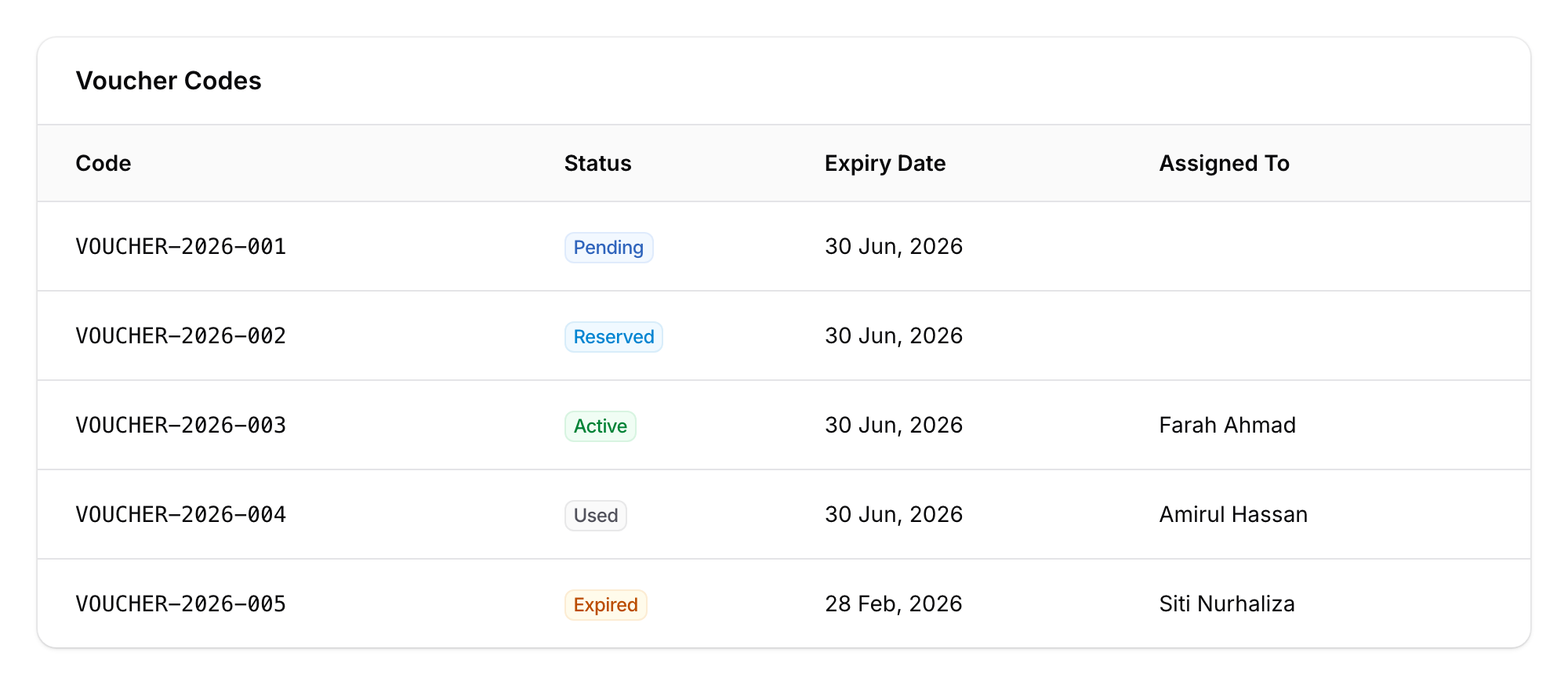
Pending (blue badge)
Imported but not yet assigned to any customer.
Reserved (sky blue badge)
Temporarily held during processing, not yet fully assigned.
Active (green badge)
Assigned to a customer. Stays Active until redeemed or expired.
Used (grey badge)
Redeemed by the customer.
Expired (amber badge)
Passed its expiry date without being used. Updated automatically by the system.
How Voucher Statuses Connect to Customer Reward Statuses
- A Pending voucher code gets assigned to a customer
- The voucher moves to Active; the customer's reward starts as Pending
- When redeemed, both move to Used
- If expired, both move to Expired
For more on the customer-side statuses, see What Do Customer Reward Statuses Mean?.
Good to Know
- Expiry is automatic — the system handles this daily.
- Not all rewards use voucher codes — Voucher statuses only apply to rewards with imported third-party codes.
- Notifications — set up WhatsApp reminders before rewards expire in the reward's notification settings.