
What Do Customer Reward Statuses Mean?
What Do Customer Reward Statuses Mean?
Customer Reward statuses track the lifecycle of a reward that has been assigned to a customer.
stateDiagram-v2
    [*] --> Pending: Reward issued
    Pending --> Used: Marked as used
    Pending --> Expired: Expiry date passed
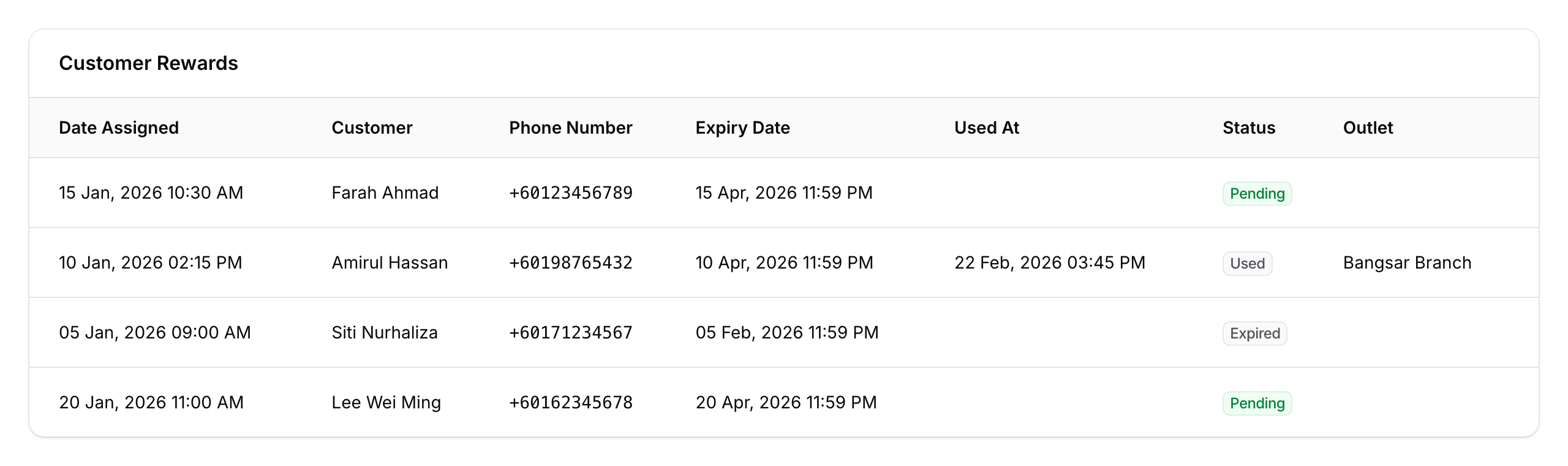
Pending (green badge)
Assigned to the customer and ready to use. You can Mark as Used, Edit, or Revoke the reward.
Used (grey badge)
Redeemed and cannot be used again. You can view when it was used and check validation tracking details.
Expired (grey badge)
The reward passed its expiry date without being used. The system handles this automatically. Assign a new reward if you'd like to give the customer another chance.
Good to Know
- Expiry is automatic — the system handles this daily.
- Revoking vs expiry — revoking removes a Pending reward early; expiry means time ran out.
- Not all rewards use voucher codes — if your reward uses imported third-party voucher codes, those have their own separate statuses. See What Do Reward Voucher Statuses Mean?.
- Notifications — set up WhatsApp reminders before rewards expire in the reward's notification settings.