
How to Run a VIP Wallet Day (Top-Up Bonus)
How to Run a VIP Wallet Day (Top-Up Bonus)
What Is This?
A VIP Wallet Day is a limited-time promotion where customers who purchase a larger amount of wallet credits receive extra bonus credits for free. It brings in cash upfront and gives loyal customers a reason to keep coming back. You can set it up yourself in minutes.
How It Works
You create the offer using promo tiers. Each tier has two values: the amount a customer needs to purchase, and the bonus credits they receive on top. The system always applies the single best tier a customer qualifies for, and tiers never stack. So with a RM500 tier and a RM1,000 tier, a customer who pays RM700 gets the RM500-tier bonus.
To set up your VIP Wallet Day:
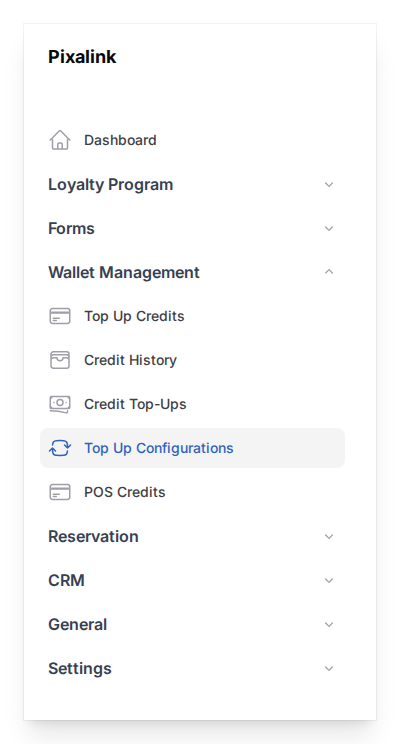
- Go to Admin Panel → Wallet Management → Top Up Configurations.
-
Open the Top up Promo configurations section and add your first tier. In Minimum Top-up Credit, enter
500. In Bonus Credit, enter40. -
Add a second tier: Minimum Top-up Credit
1000, Bonus Credit100.
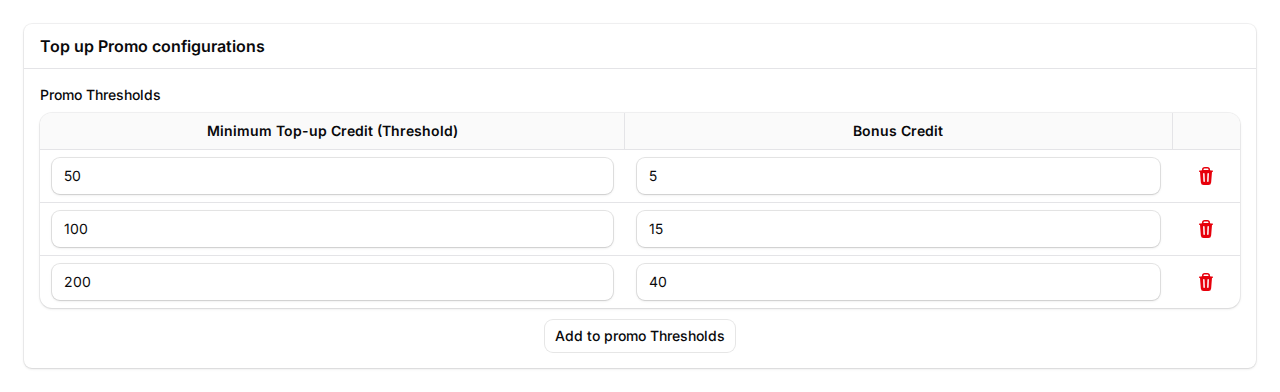
- Click Save. The bonus now applies automatically to every qualifying purchase.
How customers purchase credits. The bonus applies no matter how credits are bought. Customers can purchase credits themselves from the customer portal, if you have the online payment gateway connected, or your staff can purchase credits for them at the counter from the admin panel.
Using credits together with a reward voucher. Wallet Credits and reward vouchers are two separate systems, so a customer can use both in the same purchase. It is not one or the other. A voucher, redeemed from your rewards catalog using points, gives a discount or free item, while Wallet Credits are used to pay. A customer can apply a voucher and then pay the rest with their credits in the same visit.
Receipts. A credit purchase and a product sale are two separate events. When a customer purchases credits through the online payment gateway, Pixalink issues a credit-purchase receipt and invoice for that payment, for example "Credits Purchased, RM500 paid, Bonus +40 credits, You Receive 540 credits". When the customer later spends those credits on your products, your point-of-sale system issues the sales receipt for the goods at that moment. For how this affects your tax records, please check with your accountant.
Real-Life Example
Wei Lin runs a chain of cafes and launches a VIP Wallet Day for the festive season: pay RM500 and receive 540 credits, or pay RM1,000 and receive 1,100 credits. Customers rush to load their wallets to grab the free bonus. Wei Lin collects the cash upfront, and her regulars keep coming back to spend it down.
Good to Know
- Bonuses apply automatically. Your staff never enter anything extra during a purchase.
- The best single tier always wins. Tiers never stack on top of each other.
- Bonus credits are a loyalty reward, not cash. Customers purchase credits to spend within your business, so balances are shown in credits, not currency.
- Each tier's minimum amount must be unique. When the promotion ends, remove the tiers and save to switch the bonus off.
- Tiers apply to every customer who buys credits. You cannot limit them to VIPs or set an end time. To run a VIP offer for 72 hours, send the offer to your VIPs by WhatsApp, then remove the tiers by hand when the 72 hours are up. Anyone who buys credits while the tiers are on gets the bonus.
- The customer self-service option only appears if your account has the online payment gateway connected.
Need Help?
Reach out to our support team and we will help you launch your VIP Wallet Day.
What's Next?
- How to Set Up Credit Top-Up Settings -- the full guide to every top-up setting
- What Are Credits and How the Credit Wallet Works -- how the wallet works from start to finish
- How to Earn Points from Credit Payments -- reward customers when they pay with credits