
How to Give Loyalty Members Their Own Prices at Zeoniq POS
What Is This?
Give your best members lower prices so they keep coming back. Pixalink tells Zeoniq which tier each member is in. The member prices themselves are set up in Zeoniq, by your Zeoniq reseller.
Real-Life Example
Ahmad runs Kopi Corner in Bangsar. He wants Gold members to pay RM15 for a latte instead of RM18.
He finds the Gold tier code in Pixalink. It's 18. He messages his Zeoniq reseller: "Gold = 18, Silver = 17."
The reseller sets the Gold and Silver prices in Zeoniq. Now Gold members can get the RM15 price when they give their phone number at the counter.
How to Set It Up
No tiers yet? See How to Set Up Loyalty Tiers first.
-
Go to Admin Panel → Loyalty Program → Tier Configurations

Tier Configurations sits inside the Loyalty Program group.
-
Click View on your active tier configuration

View is the first button on the row.
-
Click the Column manager icon above the Tiers table

The icon sits next to the search box. Tier Code is hidden for now.
-
Tick Tier Code
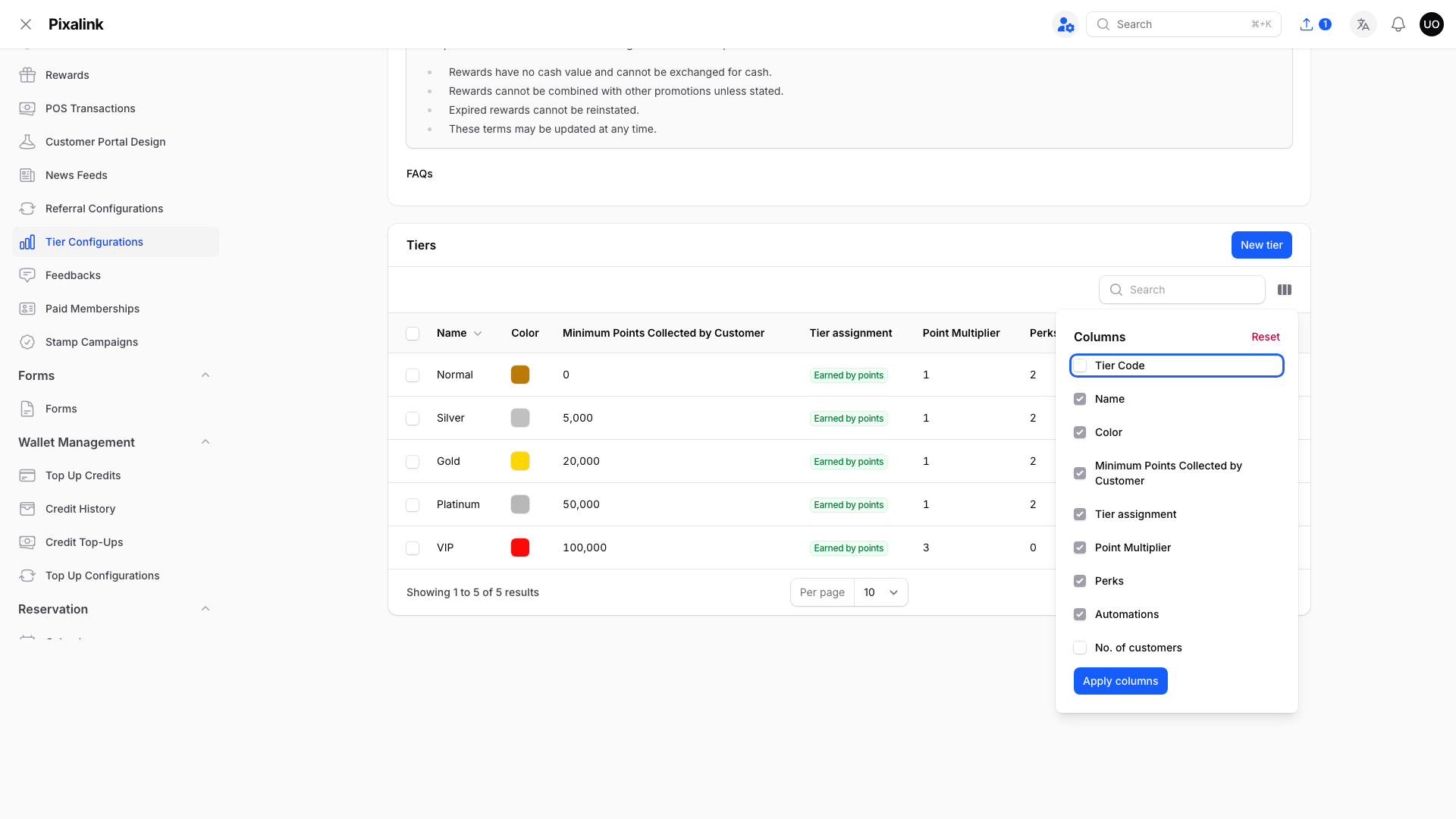
Tier Code is at the top of the list.
-
Click Apply columns

Nothing changes in the table until you apply.
-
Click a Tier Code to copy it

Each tier has its own number.
Send your reseller each tier name and code.
What Your Customers Will See
When the cashier looks up a member in Zeoniq, Pixalink sends back the member's tier code and points. A member with no tier is sent as 0.
Good to Know
- Tier Code only shows if your business uses Zeoniq or Eats365.
- Codes are not 1, 2, 3. If you delete and recreate a tier, it gets a new code. Send it to your reseller.
- A tier change shows up the next time the cashier looks the member up.
- Zeoniq finds members by mobile number, so the number must be saved in Pixalink and the member must have finished signing up.
Members Who Join at the Counter
Zeoniq can register new members. Whether your cashier's screen offers it depends on Zeoniq, so ask your reseller.
- Zeoniq must send a name and a valid mobile number.
- They start with 0 points. If the number is already registered, Pixalink does not accept it.
- If that person started signing up on your portal but didn't finish, Pixalink completes that signup instead. They keep their points, and their details are replaced with what was entered.
Joining at the counter does not count as signing up. Your New Customer campaign, rewards set to Auto-assign to New Customers, and sign-up automations don't run. If you use tiers, they still get their starting tier and what it gives.
Need Help?
Reach out to our support team.