
How Customers Manage Marketing Messages in the Customer Portal
Your customers can choose for themselves whether to receive your marketing messages, right from their own profile. This keeps your contact list clean and respects their wishes, so your broadcasts only reach people who actually want them.
What Is This?
The customer portal can show a simple checkbox on the Edit Profile page: "I want to receive marketing campaigns." A customer ticks it to keep getting your broadcasts, or unticks it to stop. It is the self-service way for customers to manage their own marketing consent, without anyone on your team having to do it for them.
The checkbox only appears once this option is switched on for your account by the Pixalink team.
How It Works
When a customer opens the loyalty portal, goes to their Profile, and chooses Edit Profile, they see the marketing checkbox.
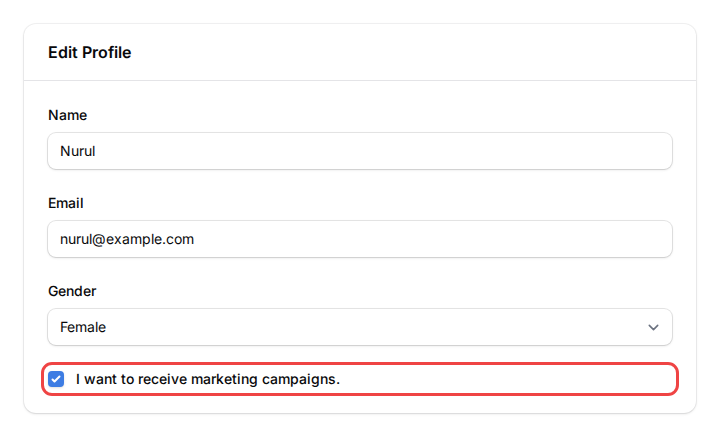
- Ticked: the customer stays open to marketing and receives your broadcast campaigns.
- Unticked: the customer is set to Do Not Contact and stops receiving your marketing broadcasts.
The change saves instantly, and the customer can switch their choice back any time.
flowchart TD
    A["Customer opens Edit Profile<br/>in the loyalty portal"] --> B{Marketing checkbox}
    B -->|Ticked| C["Status stays Open<br/>Receives your broadcasts"]
    B -->|Unticked| D["Status set to Do Not Contact<br/>Skipped from broadcasts"]
Real-Life Example
Siti runs Rasa Sayang restaurant in Shah Alam. One regular, Nurul, loves the food but finds the weekly promos a bit much.
Instead of blocking the number, Nurul opens her profile in the loyalty portal and unticks "I want to receive marketing campaigns." She keeps all her points and rewards, but Siti's broadcasts no longer reach her. A month later, before a festive sale, Nurul ticks the box again so she does not miss the deals.
Good to Know
- The checkbox only shows when the option is enabled for your account. Ask the Pixalink team to switch it on.
- Unticking sets the customer to Do Not Contact, which only stops marketing broadcasts. The customer keeps their points, rewards, and account.
- Confirmation messages, such as a reward or reservation update, are not marketing, so they still reach the customer.
- Customers can change their choice as often as they like, on their own.
Need Help?
Contact the Pixalink team to turn this option on for your account, or if a customer's preference does not seem to apply to your broadcasts.