
WhatsApp Rules of Use: Keeping Your Own Number Safe
WhatsApp Rules of Use: Keeping Your Own Number Safe
What Is This?
When you link your own WhatsApp number by scanning a QR code, WhatsApp treats it as a personal phone, not a business service. It bans numbers that behave like bulk senders. This is the list of habits that keep yours alive. Share it with anyone on your team who sends messages.
Real-Life Example
Siti at Rasa Sayang in Shah Alam let two staff send from the same number. One followed the list, the other pasted the same text to 400 people on a Saturday night. The number was stopped by Sunday, and nobody could tell which send did it until they compared the two. Siti now keeps this list printed by the till. Her rule is simple: if a message could not plausibly have been typed to one person, it does not go out.
Reference
Set the number up like a real business
- Fill in the profile picture, business name and status. A message from a blank profile gets reported by hand far more often.
- Let customers message you first where you can. A "Chat with us" link on a receipt, bill or table card is safer than you opening every conversation.
- Ask regulars to save your number. A number sitting in someone's contacts is much harder to report.
Write so no two messages are identical
- Put
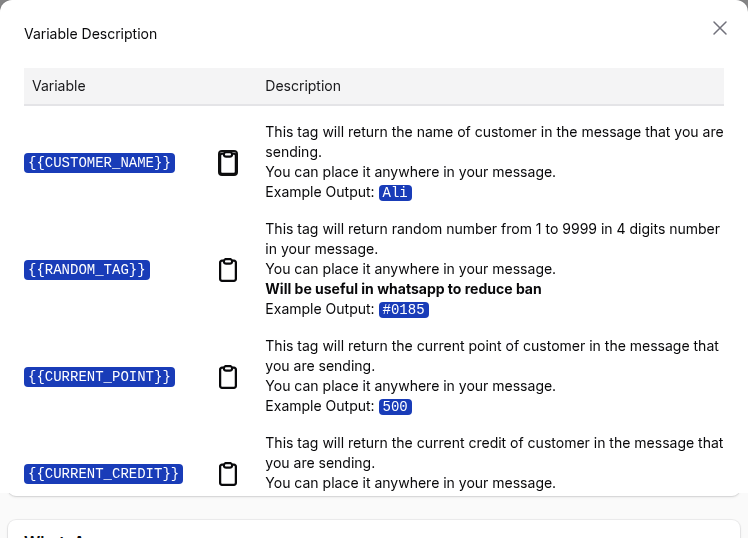
{{CUSTOMER_NAME}}in the message. Identical text sent to hundreds of people is the clearest bulk-sending signal there is. - Add
{{RANDOM_TAG}}. It drops a different four digit code into every message. Our own Show Variable window says it helps reduce bans. - Keep the first message short. One message, not three in a row.
- Only use links that start with https. Avoid any link already reported as spam elsewhere.
Send like a person, not a machine
- Use Safe Mode, with a wider gap for bigger lists.
- Switch on Randomise message intervals.
- Leave weekends off unless you trade then.
- Do not send every single day. Quiet days matter as much as slow sending.
- Send to customers near you where you can. WhatsApp expects a local number to talk to local people.
Look after the number afterwards
- Reply to anyone who replies. Real back and forth makes a number stronger.
- Drop anyone who asks to stop, the same day.
Good to Know
- Reports are what ban a number, not volume. Five to ten people tapping Report is enough. Everything above only lowers how often that happens.
- Think of it as points. You start at zero. Conversations earn, reports and blocks cost, and below zero the number is gone.
- The format makes no difference. Broadcast, group or one to one, if the content reads as spam the number still goes.
- If you see "WhatsApp Broadcasting Temporarily Limited", stop sending. Do not log out, restart or rescan the QR code. None of that clears it, and retrying can make it last longer.
- WhatsApp also caps how many brand new people you can reach in a period. When messages to new contacts start failing, slow down rather than retry.
- Official WhatsApp from Meta is not exposed to any of this. If these rules feel too tight for how you want to sell, that is the sign to move.
Need Help?
Talk to your Pixalink account manager or our support team. We can look at how your number is being used and tell you which habit is putting it at risk.