
How to Ask for a Customer Code Before Deducting Credits
What Is This?
Two-factor authentication makes staff enter a code from the customer's phone before they deduct credits. The customer opens Pay Now in your portal and shows a 6-digit code. Staff type that code before the deduction goes through.
This guide was split out of How to Give Bonus Credits When Customers Top Up.
Real-Life Example
Priya runs a spa in Johor Bahru, and customers keep large credit balances. One customer said credits went missing from her wallet. Priya turns on two-factor authentication. Now staff ask each customer to open Pay Now and read out the code before any deduction. Staff can't deduct on the main Deduct Credits window without the code from the customer's phone. Customers trust the wallet more, and Priya stops getting complaints.
How to Set It Up
-
Go to Admin Panel → Wallet Management → Top Up Configurations.

Top Up Configurations is in the Wallet Management group.
-
Turn on Enabled in the Two-Factor Authentication section.

This switch covers deductions only. Top-ups don't ask for a code.
-
Click Save at the bottom of the page.

The code is asked for from the next deduction.
-
Ask the customer to tap Pay Now on their wallet page in the portal.

Pay Now appears only while two-factor authentication is on.
-
Read the code on the customer's phone.
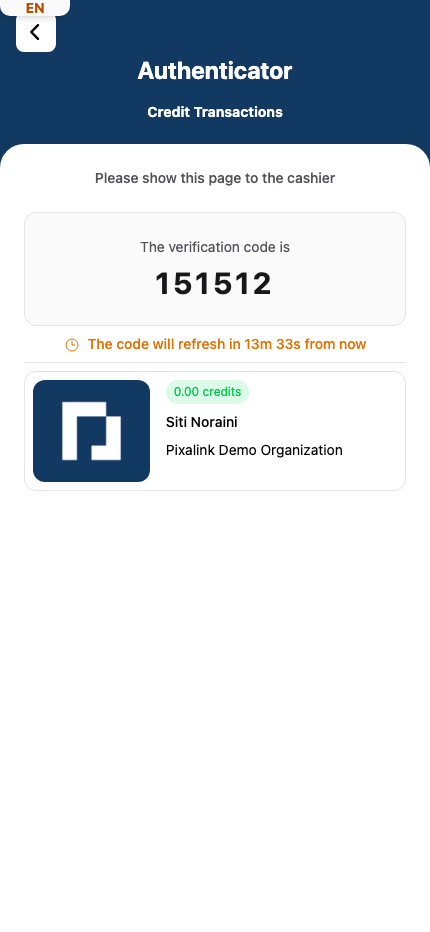
A new code appears every 15 minutes, and each code works once.
-
Type the code into Verification Code on the Deduct Credits window, then click Submit.
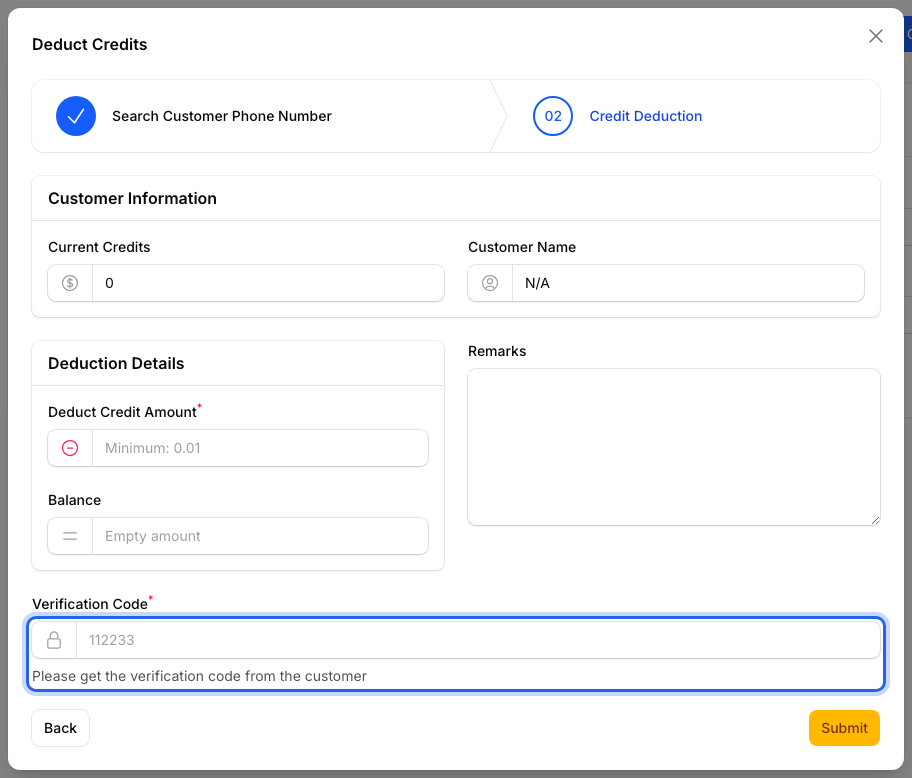
A wrong or old code shows Invalid Verification Code.
What Your Customers Will See
A Pay Now button next to their wallet balance. It opens a page that says "Please show this page to the cashier" with their code.
Good to Know
- The code is asked for on Deduct Credits, which opens from Top Up Credits and Credit History.
- Deducting from the Credits tab on a customer's profile does not ask for a code. Tell staff to use Deduct Credits instead.
- The code must match the phone number staff entered.
Need Help?
If a customer doesn't see Pay Now, two-factor authentication isn't saved as on. Check that Enabled is on, click Save, and ask the customer to reopen their wallet page.