How the Referral Program Works
What Is This?
The referral program turns your happy members into your best marketers. A member shares a link, a friend joins, and both sides earn a reward. It is word-of-mouth growth built into your loyalty program, so you win customers without paying for ads.
 Watch the video: https://www.youtube.com/watch?v=9wGU-WEZVRs
How It Works
Set up one referral program per business under Admin Panel → Loyalty Program → Referral Configurations. Each organisation has a single referral program, so once you save it the Create button steps aside for editing. Click Create, then fill in the tabs.
Start on the Information tab. Here you choose what the new friend gets and when the reward counts.
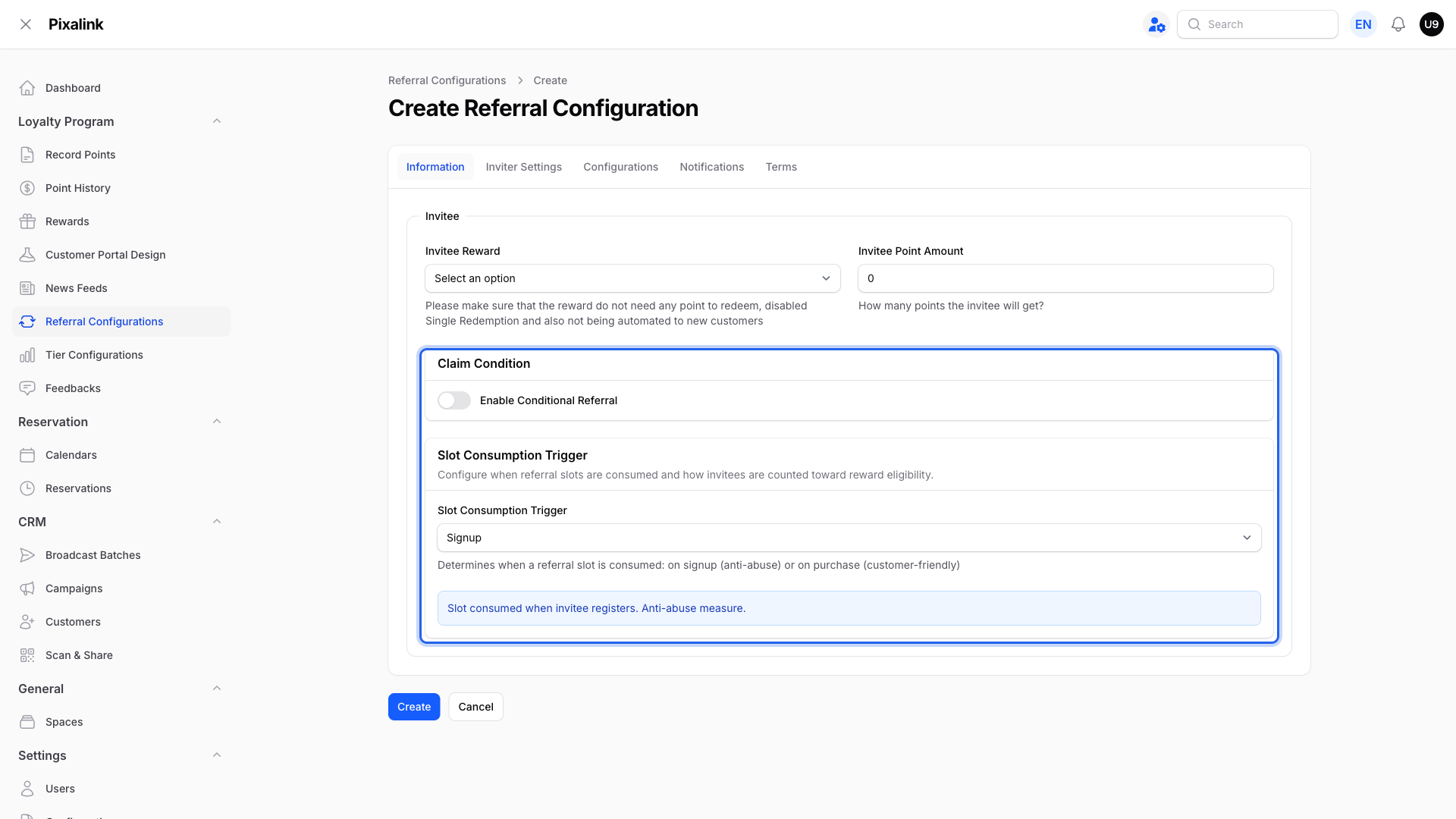
What each main setting does:
| Setting |
What it does |
| Invitee Reward |
A free voucher for the new friend. Only zero-point rewards that are not single redemption or new-customer rewards can be picked. |
| Invitee Point Amount |
Bonus points for the new friend. |
| Enable Conditional Referral |
Adds a spending condition before the reward counts. |
| Claim Condition |
The friend's first spend, any single spend, or total spend must reach a set amount. |
| Slot Consumption Trigger |
Decides when a referral slot is used up: on Signup or on Purchase. |
| Referral Items |
On the Inviter Settings tab, set what the member earns. You get up to 10 slots, one per successful referral. |
| Referral Message |
The invite text members share, with {{SPACE_NAME}} and {{REFERRAL_LINK}} placeholders. A live preview shows the share card. |
| Notifications |
WhatsApp messages to the member when a friend signs up or a reward is ready. |
| Terms |
The program rules shown to members, ready to edit. |
If your credit wallet is on, you can also give bonus credit to either side.
How a referral works for both sides:
flowchart TD
    A[Member shares their<br/>referral link] --> B[Friend joins using<br/>the link]
    B --> C{Any spending<br/>condition set?}
    C -->|No condition| D[Reward becomes ready<br/>for the member to claim]
    C -->|Has condition| E[Friend spends the<br/>set amount]
    E --> D
    D --> F[Member claims the reward<br/>from their portal]
The friend's bonus arrives as soon as they join. The member's reward becomes ready either right away (no condition) or once the friend meets the spending condition, and the member then claims it from their portal.
Members share from the Referral page in their portal. They tap Invite via WhatsApp or Show my QR, and the link carries a unique code so the right member gets credit.
Real-Life Example
Priya runs FitZone gym in Cheras and wants members to bring friends. She sets a RM10 voucher for each new friend, plus 200 bonus points for the member who invites them. She adds one rule: the friend must spend RM50 on their first visit. Nurul, a regular, shares her link on WhatsApp. Her friend joins and buys a RM60 pass. The friend gets the RM10 voucher, and Nurul's 200-point reward becomes ready to claim. Priya gains a paying member and two happy customers.
Good to Know
- More friends, more rewards. You can set up to 10 reward slots. Each successful referral uses the next slot. Each friend can be referred only once — the first member to invite them gets the credit.
- Settings apply live. Reward, point, and credit amounts are read at the moment a reward is granted or claimed. If you change them while a campaign is running, the new values apply to referrals that are still in progress.
- Turn it on first. The referral link and page appear after you switch on the referral feature in Customer Portal Design. A friend who joined earlier has no referral recorded.
- Share the portal link. The link keeps its code through the WhatsApp login. A link that loses its code will not record the referral, so members should share the one from their portal.
- Paid membership option. If you sell paid memberships, you can complete the referral only when the friend buys their first membership. It counts whether the membership is paid online or recorded by staff.
- Signup or Purchase slots. Use Signup to guard against fake sign-ups, or Purchase to count only friends who really buy.
Need Help?
Contact the Pixalink support team and we will walk you through your referral setup.
What's Next?
Video transcript: How the Referral Program Works
Your members can invite their friends, and you can reward both sides. You set up one referral program for your whole business, not one per outlet. Start with the friend who gets invited. Pick their reward, or give them points. They receive this as soon as they sign up. Enable Conditional Referral if the member should wait. This is important. The condition holds back the member's own reward. Their friend still gets their gift at sign up. Slot Consumption Trigger decides when an invite is counted. Signup counts it the moment they join. Purchase waits until they spend. On Inviter Settings you get ten slots. The first friend fills slot one, the second fills slot two, and so on. Each friend can only be referred once, so the first member to invite them gets the credit. Saving the program is not enough on its own. Go to Customer Portal Design, open the Feature tab, and make sure Referral Program is switched on. If it is on but you have not created a program yet, you will see a warning here telling you to create one first. And this is what your member sees. On their Referral page they get a ready to share invitation link. They can send it to a friend on WhatsApp, or show their QR code in person. Two things to know. Your settings apply live, so editing a reward changes what every waiting member receives. And ask members to share the link from their portal page, so their code is not lost along the way.
Video transcript: How the Referral Program Works
Your customers can invite their friends, and you can reward both sides. We call the customer who invites the inviter, and the friend who joins the invitee. You set up one referral program for your whole business, not one per outlet. Start with the invitee, the friend who gets invited. Pick their reward, or give them points. They receive this as soon as they sign up. Here is the simplest setup. With the Signup trigger, the invite counts the moment the invitee joins. The invitee gets their reward, and the inviter gets theirs, both right away. Slot Consumption Trigger decides when an invite is counted. Signup counts it the moment they join. Purchase waits until they spend. Switch to the Purchase trigger and it changes. The invitee still gets their reward at sign up. But the invite only counts once the invitee makes their first purchase, and only then does the inviter, the one who sent the invite, get their reward too. Use this when you want real spending, not just sign ups. Enable Conditional Referral if the inviter should wait. This is important. The condition holds back the inviter's own reward. The invitee still gets their gift at sign up. Conditional Referral adds a spending gate. The invitee is still paid right away. But the inviter's reward is held back until the invitee spends the minimum you set. So you reward the inviter only when the friend they brought truly spends. Let us put it together with a real example, using the Purchase trigger. On day one, Aisha shares her link and her friend Ben signs up. Ben instantly gets his five ringgit welcome voucher. On day four, Ben makes his first purchase and spends sixty ringgit. That unlocks Aisha's reward, and she gets ten ringgit off her next visit. You get ten referral slots. The first invitee fills slot one, the second fills slot two, and so on. Each invitee can only be referred once, so the first inviter to bring them gets the credit. Saving the program is not enough on its own. Go to Customer Portal Design, open the Feature tab, and make sure Referral Program is switched on. If it is on but you have not created a program yet, you will see a warning here telling you to create one first. Here is what your inviters see. On their own Referral page in the portal, they get a personal invite link and a one tap Invite via WhatsApp button, so inviting a friend takes just seconds. They can also tap Show my QR to display a scannable code. This one is great for sharing in person. The invitee simply scans it to open the sign up link on their own phone. Two things to know. Your settings apply live, so editing a reward changes what every waiting inviter receives. And your inviters invite friends from their own Referral page in the portal, where they get a ready to share link for WhatsApp and a QR code, so ask them to always share it from there.
Video transcript: How the Referral Program Works
Your customers can invite their friends, and you can reward both sides. We call the customer who invites the inviter, and the friend who joins the invitee. You set up one referral program for your whole business, not one per outlet. Start with the invitee, the friend who gets invited. Pick their reward, or give them points. They receive this as soon as they sign up. Here is the simplest setup. With the Signup trigger, the invite counts the moment the invitee joins. The invitee gets their reward, and the inviter gets theirs, both right away. Slot Consumption Trigger decides when an invite is counted. Signup counts it the moment they join. Purchase waits until they spend. Switch to the Purchase trigger and it changes. The invitee still gets their reward at sign up. But the invite only counts once the invitee makes their first purchase, and only then does the inviter, the one who sent the invite, get their reward too. Use this when you want real spending, not just sign ups. Enable Conditional Referral if the inviter should wait. This is important. The condition holds back the inviter's own reward. The invitee still gets their gift at sign up. Conditional Referral adds a spending gate. The invitee is still paid right away. But the inviter's reward is held back until the invitee spends the minimum you set. So you reward the inviter only when the friend they brought truly spends. Let us put it together with a real example, using the Purchase trigger. On day one, Aisha shares her link and her friend Ben signs up. Ben instantly gets his five ringgit welcome voucher. On day four, Ben makes his first purchase and spends sixty ringgit. That unlocks Aisha's reward, and she gets ten ringgit off her next visit. You get ten referral slots. The first invitee fills slot one, the second fills slot two, and so on. Each invitee can only be referred once, so the first inviter to bring them gets the credit. Saving the program is not enough on its own. Go to Customer Portal Design, open the Feature tab, and make sure Referral Program is switched on. If it is on but you have not created a program yet, you will see a warning here telling you to create one first. Here is what your inviters see. On their own Referral page in the portal, they get a personal invite link and a one tap Invite via WhatsApp button, so inviting a friend takes just seconds. They can also tap Show my QR to display a scannable code. This one is great for sharing in person. The invitee simply scans it to open the sign up link on their own phone. Two things to know. Your settings apply live, so editing a reward changes what every waiting inviter receives. And your inviters invite friends from their own Referral page in the portal, where they get a ready to share link for WhatsApp and a QR code, so ask them to always share it from there.
